


ElevenReader: Read Books Aloud
4.41.78K Reviews
App Specs
- Version
- 1.7.26
- Updated On
- License
- Free
- Downloads
- 1,000,000+
- Developer
- Eleven Labs Inc
- Categories
- Books & Reference
- Platform
- Android, iOS
Screenshots
 Analysis by AppCompare
When I use ElevenReader - Voice Reader, the main appeal is simple: it lets me keep up with written material when my eyes or hands are busy. That makes it useful for more than novels. I can imagine using it for a long article while making breakfast, reviewing a document on a walk, or listening to a chapter during a commute. It is a Books & Reference app from Eleven Labs Inc, and its focus is turning text into spoken audio rather than replacing a full reading or note-taking setup.
Where the first snags tend to happen
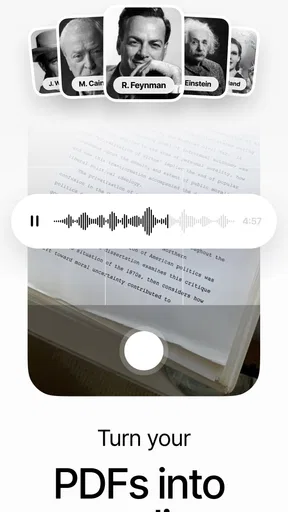
Text-to-speech sounds effortless until the source document is awkward. A clean, selectable-text document is a much better starting point than a scan made from photographs. If a PDF contains pages that are really images, a reader may have little or no text to speak; that is a document limitation, not necessarily an app failure. Before importing a lengthy file, I would test a few pages and check whether the text itself can be selected or copied.
Formatting is another common source of confusion. PDFs can contain headers, footers, page numbers, footnotes, columns, or sidebars, and a voice reader may encounter those in an order that does not sound like ordinary prose. If the narration suddenly jumps around, I would inspect the original layout before assuming the playback is broken. A straightforward text file or a less complex PDF may be easier to follow.
There is also a difference between listening and studying. Speech can help me get through a chapter, but it is not automatically a substitute for examining a chart, checking a formula, or comparing two passages on a page. For material where visual structure carries meaning, I would keep the document open and use the audio as a second channel rather than expecting narration to explain everything.
A setup routine that avoids wasted time
The app is free to install, is rated for Everyone, and has an average rating of 4.5 from around 57,000 ratings. Those figures suggest it has reached a broad audience, but they do not tell me whether my particular book or document will behave well. I would judge that with a short test file before committing to a long listening session.
ElevenReader has more than a million installs, and its current version is 1.4.97. It requires Android 7.0 or later. In-app purchases range from $0.49 to $100.00 per item, so I would check the purchase details shown in the app before choosing anything paid. The basic decision is whether the available listening experience suits your routine; there is no need to assume that every feature or voice has the same price.
When starting with a new document, I find it sensible to check three things in order: whether the text is readable, whether the opening section sounds coherent, and whether the selected voice and pace are comfortable for that material. A brisk setting may work for familiar prose but make a technical passage harder to absorb. I would begin at a moderate pace, then adjust only after hearing a full paragraph rather than judging from a sentence.
Worth Reading Before You Choose

Flipboard Shows What News Apps Must Do Beyond the Feed

Switching to Android Auto Means Rethinking Your Driving Routine

Google Calendar Makes a Crowded Week Easier to Manage

Ludo King Makes the Most of the Minutes Between Plans

Baby Panda World Brings Quick Play to Modern Phones, but Its Game Library Feels Busy

ESPN’s Live Game View Makes Following Close Games Easier
Recovering a session without losing your place
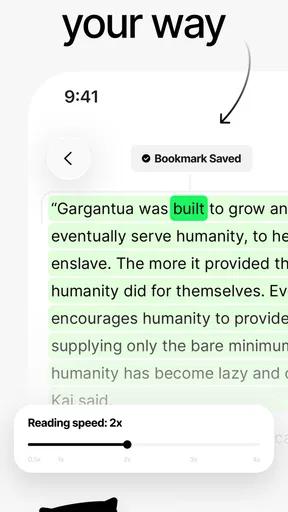
For a long reading session, I would use bookmarks and highlights deliberately instead of treating them as decoration. A bookmark can mark the point where I stopped, while a highlight can flag a useful passage to revisit. That distinction matters when I return to a book after a few days: one marker answers “Where was I?” and the other answers “What did I want to remember?”
If audio stops or a document seems to restart unexpectedly, I would first reopen the same item and check the playback position rather than immediately importing another copy. Keeping one clear version of a file also makes it easier to tell whether the trouble follows the document or the session. For study material, I would add a highlight when I hear a key idea, then return to the page later to verify the surrounding context. Listening helps me notice ideas; rereading helps me confirm them.
Multitasking is convenient, but it changes what I can realistically do. Listening while answering messages is fine for a familiar article, yet it is a poor plan for a dense chapter because each interruption breaks concentration. I get more from the app when I pair it with a low-attention task—walking a familiar route or doing a simple household chore—than when I try to absorb new information alongside another demanding activity.
When another tool may be the better fit
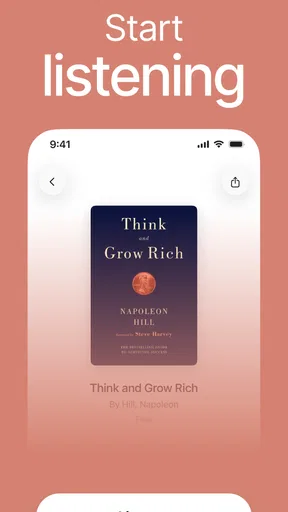
ElevenReader sits between a conventional eBook reader and a general audiobook app. A regular eBook reader is usually the better choice when I want to scan pages, inspect illustrations, or read with precise visual control. A professionally narrated audiobook is often more satisfying for a finished listening experience, especially when performance and character distinction matter. ElevenReader is most compelling when I already have text I want to hear, rather than when I am searching for a particular audiobook catalogue.
That difference also helps set expectations. AI narration is practical for articles, documents, and text-heavy books, but it may not deliver the expressive choices of a human narrator. Names, abbreviations, tables, and specialist terms can also be challenging for spoken playback. When exact pronunciation or a polished performance is important, I would preview the relevant material or choose a human-recorded edition instead.
The app is a strong fit for people who want to make existing reading material more flexible: commuters, readers who prefer audio, students reviewing prose, and anyone who wants to listen while doing a simple task. It is less suitable for someone who needs detailed visual analysis, a full research annotation system, or a curated audiobook library as the main attraction. Those needs are better served by a dedicated reader, reference tool, or audiobook service.
Getting Started with ElevenReader
First off, downloading and installing the ElevenReader - Voice Reader is a breeze. It's available on both Android and iOS, so you can easily find it in your app store. Once installed, the app greets you with a clean and intuitive interface. No clutter, just the essentials, which is something I truly appreciate. It's like a breath of fresh air amidst so many overly complicated apps.
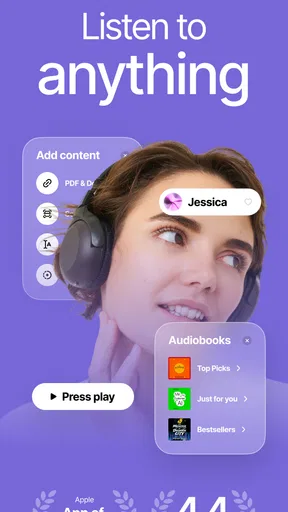
The setup process is straightforward. You can quickly upload your documents or articles, and the app supports a wide range of formats such as PDF, TXT, and more. I was pleasantly surprised by how seamless it was to get started.
Features That Stand Out
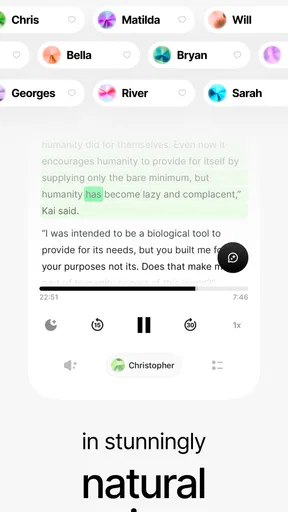
One of the standout features of this app is its customizable voice settings. You can choose from a variety of voices and even adjust the speed to match your preference. I found this particularly helpful when I wanted to breeze through some content or take my time with more complex material.
Moreover, the app offers offline capabilities. This means you can download your content and listen to it without needing an internet connection. Perfect for those long flights or when you're out of data. It's a lifesaver!
Another nifty feature is the bookmark and highlight options. You can easily bookmark sections of the text you want to revisit or highlight important points. It's like having your own virtual assistant, keeping track of all those bits you don't want to forget.
The User Experience
Now, let's talk about the user experience. The app runs smoothly, with no noticeable lag or glitches. The voice quality is impressive, and the AI does a great job of maintaining a natural cadence. Whether it's a novel, an academic paper, or a news article, it feels like having a personal narrator.
One thing that really caught my attention is the ability to multitask. The app allows you to listen while you use other apps. So, whether you're scrolling through social media or responding to emails, your reading doesn't have to stop.
What Could Be Improved?
While ElevenReader - Voice Reader is packed with features, there are a couple of areas where it could improve. For one, the variety of voices could be expanded further. Though the current selection is decent, having more options would cater to a wider audience.
Additionally, integrating with more third-party apps would be a plus. Imagine being able to seamlessly connect with your favorite eBook platforms or note-taking apps. It would enhance usability and make the app even more versatile.
Final Thoughts
Overall, ElevenReader - Voice Reader is a fantastic tool for anyone looking to consume written content in audio form. It's user-friendly, efficient, and offers a range of features that cater to different reading needs. Whether you're a student, professional, or just someone who loves books, this app can make your life easier.
If you're curious to try it out, you can find it on your respective app store. Give it a whirl and see how it fits into your reading routine. Happy listening!
My most practical test would be an ordinary weekday: I have a PDF report to get through, but I am preparing lunch and cannot sit with the screen. I would import the report, listen to the opening page, and check whether headings and paragraphs come through in a sensible order. If they do, I can continue while doing a simple task. If the narration reads page furniture or breaks sentences oddly, I would stop there and use the PDF visually, or find a cleaner text version. That small trial prevents wasting half an hour on a file that was never suitable for audio.
Small habits that make listening more useful
For nonfiction, I would divide a long session into manageable stretches and leave a bookmark at a natural stopping point, such as the end of a section. That is more reliable than trying to remember a timestamp. I would reserve highlights for ideas worth checking later, rather than marking every sentence that sounds important; too many markers turn review into another chore. When I need to quote or cite something, I would return to the source and verify the wording instead of relying on what I remember hearing.
Voice and speed are not just comfort settings. They affect comprehension differently depending on the writing. A familiar novel may tolerate faster playback, while a technical explanation often needs a slower pace and fewer distractions. I would also sample a passage with names or abbreviations before choosing a long book, since a voice that handles ordinary sentences well may still stumble over specialist vocabulary. This is a useful test even when the overall narration sounds natural.
Choosing the right material and expectations
One question readers often have is whether the app is for books only. Its appeal is broader: I would consider it for text-based documents and articles as well as eBooks, provided the words are actually accessible as text. That makes it especially handy for material I already own or have been sent, while a dedicated audiobook service is a more direct route when I want a professionally produced title and do not need to bring my own document.
Another practical question is whether it can replace reading on screen. For me, not completely. Audio is excellent for moving through continuous prose and freeing my eyes, but it is slower to search visually, compare sections, or absorb information arranged in a chart. I would use listening to make progress, then switch back to the page whenever precision, visual layout, or quick scanning matters.
If playback or import behaves oddly, I would work through the simplest checks first: confirm the source contains selectable text, try a short passage, and see whether the issue happens with another document. If only one file causes trouble, its structure is the likely obstacle. If several files behave the same way, restarting the app and checking that it is current are reasonable general steps before trying again. This approach separates a troublesome source from a broader session problem without assuming a cause too quickly.
My practical verdict
What I like most is the flexibility: ElevenReader can turn reading time into listening time without requiring me to abandon the documents already in my routine. The trade-off is that flexibility depends on the source. Clean prose can be comfortable and useful; complex layouts, dense technical material, or expectations of dramatic audiobook performance can expose the limits of text-to-speech.
I would recommend giving it a short, low-stakes trial with a document you know well. That lets you judge the voice, pace, and text handling before relying on it for study or a long commute. If those basics suit you, the app can become a practical companion for reading around daily tasks. If you mainly want polished narration, visual page control, or advanced document analysis, I would choose a tool designed around that need instead.
Pros
- Natural-sounding voice options available.
- Supports multiple languages for diverse users.
- Simple interface for easy navigation.
- Offline mode for reading without internet.
- Customizable reading speed settings.
Cons
- Limited free version features.
- Occasional mispronunciations.
- Requires frequent updates for improvements.
- Ads can be intrusive in free version.
- May not support all document formats.
FAQs for ElevenReader: Read Books Aloud
What is ElevenReader - Voice Reader used for?
ElevenReader - Voice Reader is an application designed to convert text into speech, allowing users to listen to written content on their devices. It's ideal for multitasking, enabling you to absorb information while engaging in other activities like driving, exercising, or relaxing.
Is ElevenReader compatible with all file types?
ElevenReader supports a wide range of file types, including PDF, DOCX, TXT, and EPUB. This versatility ensures that users can listen to various documents and eBooks without needing to convert files, offering convenience and accessibility for diverse reading materials.
Can I customize the voice settings in ElevenReader?
Yes, ElevenReader offers several customization options for voice settings. Users can choose from different voice types, adjust the speed and pitch, and select preferred languages. This personalization enhances the listening experience, catering to individual preferences for clarity and comfort.
Does ElevenReader require an internet connection?
ElevenReader primarily functions offline, allowing users to listen to texts without an internet connection. However, some features, like downloading additional voices or updates, may require internet access. This offline capability ensures reliability and convenience, especially when traveling.
Is ElevenReader accessible for users with disabilities?
ElevenReader is designed with accessibility in mind, making it a valuable tool for users with visual impairments or reading difficulties. The app's intuitive interface and customizable voice options provide an inclusive experience, facilitating easier access to written content for all users.


